











 Assistant
What is enterprise search and how does it help?

Enterprise search is the technology that enables employees of an organization to find information stored across the company’s internal systems — documents, databases, emails, knowledge bases, CRM records, engineering files, and more — through a single search interface. Unlike consumer search engines like Google, which index the public web, enterprise search indexes an organization’s private data environment and returns results only to users who are authorized to see them.
It sounds straightforward. In practice, it is one of the most complex problems in enterprise software.
The Enterprise Search Problem
The average large organization stores information in dozens — sometimes hundreds — of disconnected systems. SharePoint holds some documents. Salesforce holds customer data. SAP holds operational records. Engineering teams use PLM systems. Compliance teams have their own repositories. Finance uses ERP. Researchers have their databases.
None of these systems were designed to be searched together. Each has its own access model, its own data format, and its own search interface. When an employee needs information, they have to know which system it’s probably in, know how to query that system, and repeat the process across multiple systems if the first search doesn’t surface what they need.
This is the enterprise search problem: not a shortage of data, but an inability to access the data that exists.
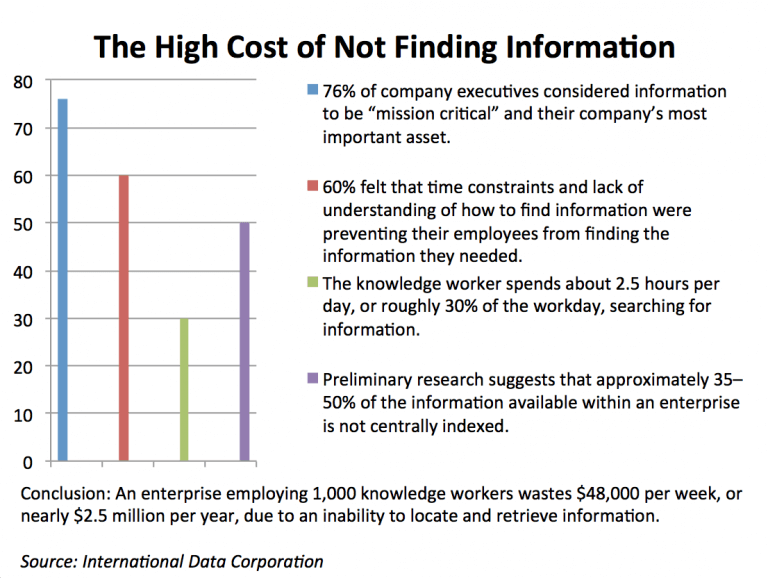
IDC estimated that knowledge workers spend approximately 30% of their workday searching for information. More recent research from McKinsey found that 20% of working time goes to finding internal information or locating colleagues with relevant expertise. At an organization of 10,000 people, that is the equivalent of 2,000 full-time employees doing nothing but looking for things every single day.
Enterprise search is designed to solve this by creating a single, unified search layer across all of an organization’s information systems.
How Enterprise Search Works
Enterprise search operates through three connected processes: crawling and connecting, indexing and enrichment, and retrieval and ranking.
Crawling and Connecting
The enterprise search platform connects to the organization’s data sources through a library of pre-built connectors — integrations with SharePoint, Salesforce, SAP, ServiceNow, Confluence, iManage, databases, file systems, and hundreds of other enterprise applications. These connectors continuously crawl each connected source, retrieving new and updated content. Crucially, they also retrieve the access control metadata from each source — the permission model that governs who is allowed to see what — so that this governance is preserved in the search layer.
Indexing and Enrichment
Raw content from across the organization is not searchable in its original form. The indexing process transforms it: extracting text from documents in dozens of formats, applying Natural Language Processing (NLP) to understand semantic meaning rather than just words, identifying named entities (people, organizations, products, locations), classifying documents by type and topic, and storing the enriched content in a search index optimized for fast, relevant retrieval.
This enrichment layer is what separates enterprise search quality from basic file system search. A document about “turbocharger component failure on the A380 program” is not just a document containing those words — it is a document related to the A380 aircraft, the turbocharger subsystem, failure mode analysis, and potentially dozens of related engineering concepts that standard keyword indexing would not connect.
Retrieval and Ranking
When an employee submits a query, the enterprise search platform does not simply return documents containing the query terms. It applies relevance ranking — weighing semantic similarity, the user’s role and search history, document authority, recency, and the query intent — to surface the most useful result for this specific person asking this specific question. Access controls are applied at retrieval time: the results a user sees reflect both relevance and what they are authorized to access. An employee without clearance for a specific project should never receive documents from that project in their search results, regardless of how relevant those documents might otherwise be.
Why is enterprise search strategic in big companies?
Content without access is worthless
Enterprise search helps people in an organization find the information they need to perform their jobs. It gives them access to data extracted from inside the business, along with external data sources like document management systems, databases, paper and so forth.
Time is money: how Enterprise Search increases productivity
Studies reveal the cost of employees spending time finding knowledge:
- “The knowledge worker spends about 2.5 hours per day, or roughly 30% of the workday, searching for information.” – IDC
- “The research found that on average, workers in both the U.K. and U.S. spent up to 25 minutes looking for a single document in over a third of searches conducted.” – SearchYourCloud
- “The average digital worker spends an estimated 28 percent of the workweek searching e-mail and nearly 20 percent looking for internal information or tracking down colleagues who can help with specific tasks.” – McKinsey & Company
Enterprise search software reduces the time employees require to find the necessary information. As a result, it opens up work schedules for more high-value tasks. This improvement is particularly important given the current emphasis on getting optimal performance out of teams in lean, digital, agile organizations.
Enterprise Search, Insight Engine or Cognitive Search
Cognitive search, the new generation of technology for information gathering, uses AI capabilities like NLP and machine learning to ingest, analyze and query digital data content from multiple sources. Users receive results that are more relevant to their intentions. Cognitive search solutions are essential to delivering the most valuable customers and employee experiences.
Apply Enterprise Search to many Use Cases
Enterprise search engines can put to work across many different use cases in order that are intended to improve productivity:
- Digital workplace – Enabling teams to be more productive and collaborate effectively using enterprise search as part of an overall digital workplace experience.
- Customer service – Giving customer service representatives the ability to quickly and easily find the information they need to deliver excellent customer service.
- Knowledge management – Applying enterprise search to facilitate the corporate knowledge management process.
- Contact experts – Letting employees search for experts and filter results according to expertise and knowledge.
- Talent search – Matching candidates with job descriptions from a database of potential candidates.
- Intranet search – helping intranet users locate information they need from shared drives and databases.
- Insight engines – Leveraging AI to detect relationships between people, content and data as well as connections between user interests and current and past search queries.
What Has Changed: Enterprise Search in the Age of AI
The enterprise search landscape changed fundamentally between 2022 and 2026. The introduction of large language models (LLMs) and the development of RAG (Retrieval-Augmented Generation) created a new category of capability that is still called “enterprise search” but functions in a qualitatively different way.
From Retrieving Documents to Generating Answers
Traditional enterprise search retrieves documents. AI-powered enterprise search, built on RAG architecture, synthesizes answers. Instead of returning a list of documents that contain relevant information, a RAG-enabled enterprise search platform retrieves the relevant content from across the organization’s data environment and then generates a response — a direct answer, a summary, a synthesis — grounded in and cited from those source documents.
For an engineer asking “what were the failure modes identified in the 2019 load testing for Project X?”, traditional enterprise search returns the documents from Project X that mention load testing and failure modes. AI-powered enterprise search returns a synthesized answer drawn from those documents, with citations — so the engineer gets the answer in seconds rather than reading through a stack of retrieved documents.
The Retrieval Layer Is the Foundation
Here is the critical distinction that most discussions of enterprise AI miss: the quality of an AI assistant’s output depends entirely on the quality of its retrieval layer. An LLM that generates answers without grounding them in the organization’s actual data produces confident-sounding responses that may be wrong, outdated, or simply invented. RAG — Retrieval-Augmented Generation — is the architecture that connects AI generation to real organizational data.
Enterprise search is the retrieval layer. The quality of enterprise search directly determines the quality of every AI output that depends on it. Organizations that deployed high-quality enterprise search infrastructure — with semantic indexing, comprehensive data coverage, and access-controlled retrieval — found that adding AI capabilities on top was straightforward. Organizations that had not invested in search quality found that AI deployed on top of fragmented, poorly indexed data produced exactly the hallucination and reliability problems that make enterprise AI unacceptable for business-critical decisions.
From Search to Agents
The latest evolution of enterprise search extends further: from AI that answers questions on demand to AI agents that act proactively. AI agents built on enterprise search infrastructure monitor the organization’s information environment continuously, detect changes and developments relevant to specific roles or workflows, and surface information without waiting to be asked. A maintenance engineer’s AI agent monitors technical documentation, equipment databases, and operational records for developments relevant to their assets. A pharmaceutical researcher’s AI agent monitors regulatory databases and scientific literature for updates relevant to their therapeutic area. This is not science fiction.
Enterprise Search vs. Related Technologies
Enterprise Search vs. Microsoft Copilot / Google Workspace AI
Microsoft Copilot and Google’s AI features are designed to enhance productivity within their respective ecosystems — Microsoft 365 documents, emails, Teams conversations, Google Docs and Gmail. They do not connect to the organization’s full data environment. An engineer who needs information from a PLM system, a specialized database, or a document repository outside the Microsoft or Google ecosystem will not find it through Copilot or Google AI. Enterprise search is designed for the full breadth of an organization’s information landscape — including the specialized, industry-specific, and legacy systems that productivity suite AI tools do not reach.
Enterprise Search vs. Intranet Search
Intranet search typically covers the organization’s internal web pages and SharePoint-hosted documents. Enterprise search connects across every data source the organization uses — including systems that have no intranet presence at all. For organizations where the most valuable knowledge lives in PLM systems, specialized databases, or older document repositories, intranet search covers a small fraction of what enterprise search addresses.
Enterprise Search vs. Database Search
Database search queries structured records in specific databases. Enterprise search is designed for heterogeneous environments where valuable information is distributed across structured databases, unstructured documents, semi-structured content, and everything in between — unified through a single query interface with consistent relevance ranking across all sources.
Key Capabilities of Modern Enterprise Search
- Semantic Search and NLP: Understanding what a query means, not just what words it contains. Semantic search returns results about the concept being searched, not just documents that contain the literal search terms.
- Unified Multi-Source Retrieval: Connecting to and searching across all of an organization’s data sources simultaneously, through pre-built connectors that maintain the governance model of each source system.
- Access-Controlled Retrieval: Enforcing data access permissions at retrieval time, based on the permission model of the originating system. Every result a user sees is one they are authorized to see — not filtered after retrieval, but controlled at the moment of retrieval.
- AI-Powered Synthesis (RAG): Generating cited, grounded answers from the organization’s knowledge environment rather than simply returning a list of documents.
- Expert Discovery: Identifying the people in the organization with relevant expertise for a given query — not based on self-reported profiles but on demonstrated expertise inferred from documents and contributions.
- Multilingual Support: Processing and retrieving content in multiple languages, enabling organizations with global operations to make all their knowledge searchable regardless of the language in which it was created.
How to Evaluate Enterprise Search for Your Organization
When evaluating enterprise search platforms, the questions that matter most are:
- Data coverage: How many of our actual data sources does it connect to? Does it include the specialized systems that contain our most valuable information — not just SharePoint and email?
- Retrieval quality: Does the relevance model understand the professional and technical language of our industry? Will searches for concepts (not just keywords) return the right results?
- Security architecture: Are access controls enforced at the retrieval layer — at the moment documents are retrieved — or as a post-processing filter that could be bypassed? Is the security model compatible with our most sensitive data environments?
- AI integration: Is the platform designed as a foundation for AI assistants and agents, or is AI a feature bolted onto a traditional search architecture? The difference significantly affects what AI capabilities can be built on top of it.
- Scalability and governance: Can the platform scale to our full data environment without degrading retrieval quality? Does it provide the audit trail and observability that compliance and IT functions require?
Enterprise Search in 2026: The Bottom Line
Enterprise search began as a productivity tool, a better way to find files. It has become the knowledge infrastructure layer that determines how effectively large organizations can use their accumulated data for decisions, operations, and AI-powered workflows.
In a world where AI agents and RAG-powered assistants are increasingly making business decisions on the basis of retrieved organizational knowledge, the quality of enterprise search is the quality of organizational intelligence. Organizations with high-quality enterprise search infrastructure can deploy AI that is reliable, grounded, and auditable. Organizations without it deploy AI that sounds confident but may be wrong on exactly the questions where accuracy matters most.
The enterprise search question is no longer “how do we help employees find documents faster.” It is “how do we build the knowledge infrastructure that makes our organization’s AI trustworthy.”
Explore our Enterprise AI Search Platform
Book a DemoShare